
Free Printable Progress Tracker for Parents and Teachers
Quick answer
A progress tracker is a one-page record of the worksheets a child has done, at which level, and how they got on. Download the free tracker for one child or for a class, in the version that matches your grade names (GrowAndGrade, United States or United Kingdom), tick the grade and subject, and fill in one row per worksheet. Move a child up a level when they get about 8 out of 10 right by themselves.
Children often make progress so gradually that it's hard to see. A simple tracker makes it visible: a row for each worksheet, the level it was done at, and how it went. After a few weeks you can see at a glance which skills are secure, which need more practice, and when a child is ready for something harder.
We've made two free printable trackers, each in three versions so the grade names match your school system. If you're still choosing which worksheets to use, our guide to free printable worksheets for homeschool, teachers and tutors explains how to pick good ones and the right level.
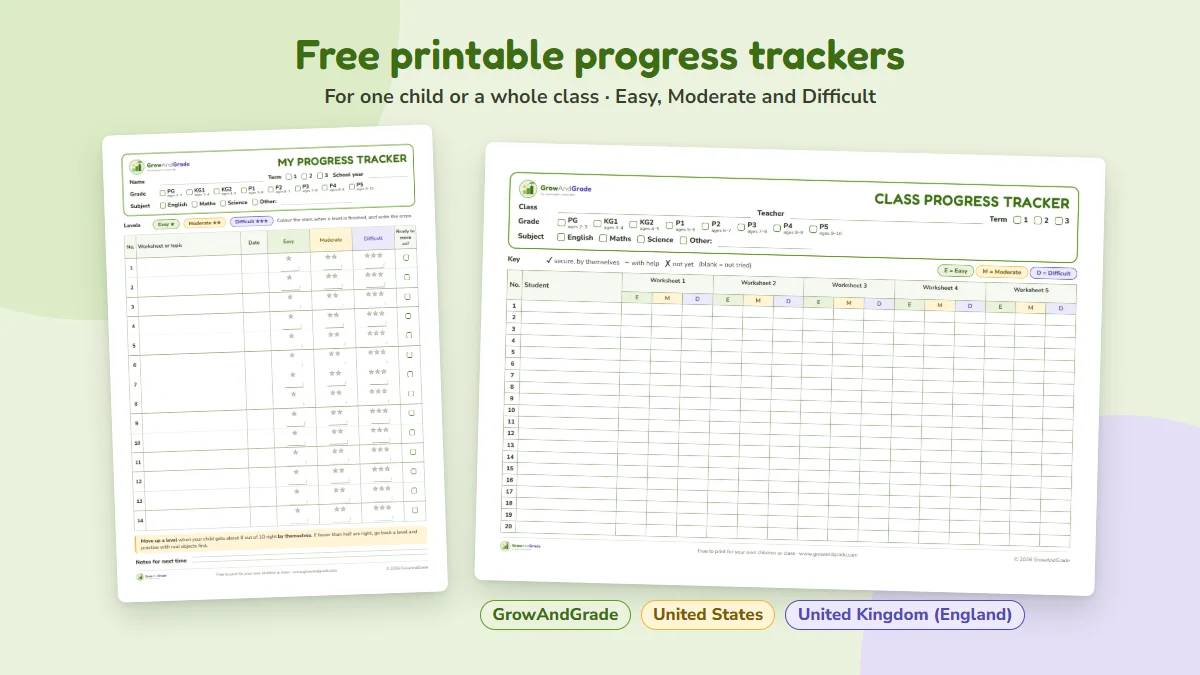
Download the tracker you need
Choose the version that uses the grade names you know. The trackers work with any worksheets, not only ours.
| Version | One child | A class |
|---|---|---|
| GrowAndGrade: Playgroup to Primary 5, A4 | Download PDF | Download PDF |
| United States: Preschool to 5th grade, US Letter | Download PDF | Download PDF |
| United Kingdom (England): Pre-school to Year 5, A4 | Download PDF | Download PDF |
The one-child tracker suits parents and tutors; the class tracker is for teachers. All six are free, with no sign-up, and you may print as many copies as you need for your own children or class.
How to use the tracker for one child
- Fill in the top. Write your child's name, tick the term (or quarter) and the grade, and tick the subject, or write your own under "Other".
- One row per worksheet. Write the worksheet name or topic and the date.
- Record the level. Your child colours the stars for the level they finished: one star for Easy, two for Moderate, three for Difficult. Write the score underneath, for example 8/10.
- Decide what's next. Tick "Ready to move on?" when the level felt comfortable. Use the notes lines for anything to practise next time.
Children love colouring the stars, and a full page of stars is a real boost at the end of a term.
How to use the class tracker
The class tracker has room for 20 students and 5 worksheets, each with Easy (E), Moderate (M) and Difficult (D) columns. Write the worksheet or topic at the top of each group, then mark each child with the simple key:
- ✓ secure: did it correctly by themselves
- ~ with help: got there with support
- ✗ not yet: needs more teaching first
A row of ticks shows who is ready to move up; a column of "~" and "✗" shows a skill the whole class needs to revisit. It also makes differentiation simple: the next day, each child starts at the level the tracker shows.
When should a child move up a level?
Move up when your child gets about 8 out of 10 right by themselves. If they get fewer than about half right, go back a level and practise with real objects or examples before trying the worksheet again. Somewhere in between is just right: keep practising at that level.
Every GrowAndGrade worksheet comes in three levels, so moving up means doing the same skill at a harder level, not starting a new topic. Our guide to choosing the right level has more detail.
Tips for tracking that actually helps
- Fill it in straight away, while you both remember how the worksheet went.
- Look back every two weeks. Three ticks on the same skill means it's time for something new.
- Praise effort, not only scores. "You kept going on the tricky ones" matters as much as 10/10.
- Keep the trackers together in a folder with the worksheets. For homeschool families, it doubles as a simple record of the year.
Looking for worksheets to track? Start with the free worksheets, every one with an answer key, or read our guide to free printable worksheets for homeschool, teachers and tutors.
Questions parents ask
Is the progress tracker really free?
Yes. All six versions are free PDFs with no sign-up. You may print as many copies as you need for your own children or class.
Which version should I download?
The one whose grade names you use: GrowAndGrade (Playgroup to Primary 5), United States (Preschool to 5th grade, on US Letter paper) or United Kingdom (Pre-school to Year 5, England).
Can I use the tracker with worksheets from other websites?
Yes. The tracker works with any worksheets; just write the worksheet name or topic in each row.
What do the stars mean?
One star is Easy, two stars Moderate and three stars Difficult. Your child colours the stars for the level they finished, and you write the score underneath.
Sources and further reading
- Education Endowment Foundation, Teaching and Learning Toolkit: Feedback
- Paul Black and Dylan Wiliam, Inside the Black Box: Raising Standards Through Classroom Assessment (1998)
- GrowAndGrade curriculum maps for Playgroup to Primary 5